MSN Home
|
My MSN
|
Hotmail
Web Search:
Groups
Free Forum Hosting
Important Announcement
The MSN Groups service will close in February 2009
. You can
move your group
to
Multiply
, MSN’s partner for online groups.
Learn More
TINAGOLDS
TINAGOLDS@groups.msn.com
What's New
WELCOME
Office.
● .·:*¨¨*:·.● ·:*¨¨*:·.●
DANS STOP TAGS
General
Likes ..Dislikes
MESSAGE.BACKS
Group Rules
SITE MAP
● .·:*¨¨*:·.● ·:*¨¨*:·.●
MEET THE STAFF
GROUP LINKS
REQUEST PAGE
TINAs ALWAYS
PSP..CORNER ..
NO NOs Yes Yes
HTML Color
● .·:*¨¨*:·.● ·:*¨¨*:·.●
MAIL BOX
☼♫♡MUSIC☼♫♡
T.Golds Piczo Site
Photobucket how
FUN&GAMES ROOM
♥♥گ♥گ♥گ♥♥
:*:·CHAT.ROOM:*:·
♥♥گ♥گ♥گ♥♥
M.S.N TUT's
MSN has 2 servers:
♥♥گ♥گ♥گ♥♥
MY.BANNERS
Add Your Banner
♥♥گ♥گ♥گ♥♥
Tinagolds Awards
►AWARDS REQUEST►
♥♥گ♥گ♥گ♥♥
Windows_XP
~.Prayer Room~.
♥♥گ♥گ♥گ♥♥
Pictures
♥♥گ♥گ♥گ♥♥
Health
▬▬▬▬▬▬▬
Documents
Y
♥♥گ♥گ♥گ♥♥
PINK welcome to the group
Your Web Page
Tools
Managers Office
: SPARKLE TUT
Choose another message board
Reply
Message 1
of 1 in Discussion
From:
TinaGolds©1
(Original Message)
Sent: 1/24/2007 11:34 PM
</SCRIPT>
PLEASE DO NOT COPY THIS
OR PLACE IT IN ANY GROUP
THIS IS FOR TINAGOLDS MEMBERS
IF YOU WOULD LIKE TO JOIN
PLEASE CLICK HERE
http://groups.msn.com/TinaGolds
~~~~~~~~~~~~~~~~~~~
I am self taught so i try to explain how i use the sparkle
by doing it this way you don't need a plug-in
Your Sparkle
added in Attachment
at the foot of this page
~~~~~~~~~~~~
open the zip i have added
~~~~~~~~~~~~~
unZip and save to folder where you can get it
it is a small white sparkle so wont show on white background
~~~~~~~~~~~
Save this tube to your hard drive
and open in Animation shop
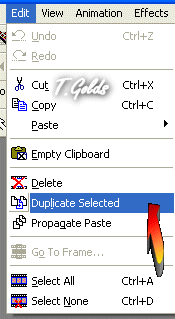
Now go to Edit then down to Duplicate..Selection
Now you have 2 frames
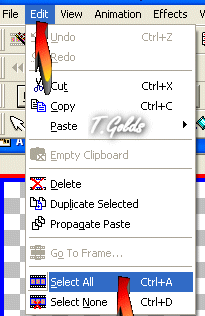
now go back to Edit down to Select all
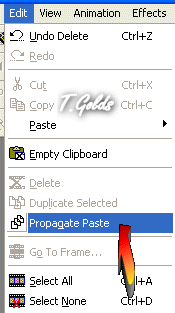
Back to Edit down to
Now open your Sparkle
you will see the first frame as blue on it
put your curser on it and drag it to your heart but make sure
all 2 frames are activated what i mean is blue at the bottom
just add the sparkle to where ever you want on
your no 1 Frame once
click back on your sparkle as you will see there is nothing their
so go to Edit and click undo
and keep repeating this un till you have all the sparkle
you need on your tube
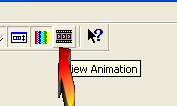
then click on the View Animation
at the top of the page
If you like what you see save it
hope you have learned some thing new
Tina ♥
First
Previous
No Replies
Next
Last
MSN Home
|
My MSN
|
Hotmail
|
Search
Feedback
|
Help
©2005 Microsoft Corporation. All rights reserved.
Legal
Advertise
MSN Privacy



 Free Forum Hosting

 Important Announcement





 First
First 