MSN Home  |  My MSN  |  Hotmail
Sign in to Windows Live ID Web Search:   
go to MSNGroups 
Free Forum Hosting
 

Important Announcement Important Announcement
The MSN Groups service will close in February 2009. You can move your group to Multiply, MSN’s partner for online groups. Learn More
TINAGOLDSContains "mature" content, but not necessarily adult.TINAGOLDS@groups.msn.com 
  
What's New
  
  WELCOME  
  Office.  
  ● .·:*¨¨*:·.● ·:*¨¨*:·.●  
  DANS STOP TAGS  
  General  
  Likes ..Dislikes  
  MESSAGE.BACKS  
  Group Rules  
  SITE MAP  
  ● .·:*¨¨*:·.● ·:*¨¨*:·.●  
  MEET THE STAFF  
  GROUP LINKS  
  REQUEST PAGE  
  TINAs ALWAYS  
  PSP..CORNER ..  
  NO NOs Yes Yes  
  HTML Color  
  ● .·:*¨¨*:·.● ·:*¨¨*:·.●  
  MAIL BOX  
  ☼♫♡MUSIC☼♫♡  
  T.Golds Piczo Site  
  Photobucket how  
  
  Friendship Stars  
  FUN&GAMES ROOM  
  ♥♥گ♥گ♥گ♥♥  
  :*:·CHAT.ROOM:*:·  
  ♥♥گ♥گ♥گ♥♥  
  M.S.N TUT's  
  MSN has 2 servers:  
  ♥♥گ♥گ♥گ♥♥  
  MY.BANNERS  
  Add Your Banner  
  ♥♥گ♥گ♥گ♥♥  
  Tinagolds Awards  
  ►AWARDS REQUEST►  
  ♥♥گ♥گ♥گ♥♥  
  Windows_XP  
  ~.Prayer Room~.  
  ♥♥گ♥گ♥گ♥♥  
  Pictures  
  ♥♥گ♥گ♥گ♥♥  
  Health  
  ▬▬▬▬▬▬▬  
  Documents  
  ♥♥گ♥گ♥گ♥♥  
  PINK welcome to the group  
  Your Web Page  
  
  
  Tools  
 

How to use Photobucket in MSN groups
 
Make sure you have your group website open in one window then open a second
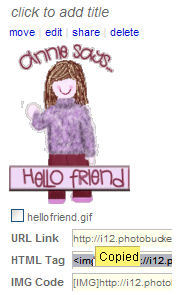
  • go to http://photobucket.com  and get an account ( follow the instruction on their website to upload your picture)
  • Go to the picture you want to use
  • Under the picture there are 3 options you need the HTML one click on that box and a yellow word copied will pop up.


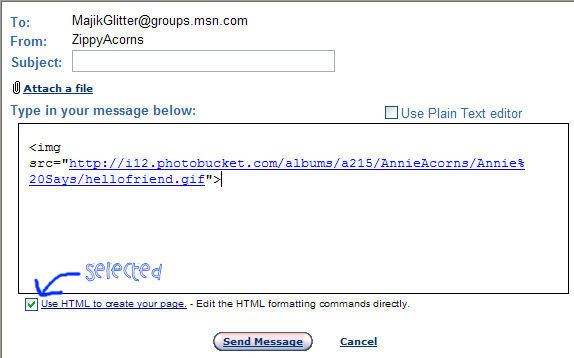
  • Open a new message or reply window in the MSN group.
  • Select Use HTML to create your page and paste the code ( Ctrl +V)

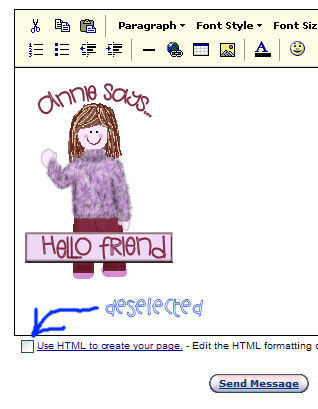
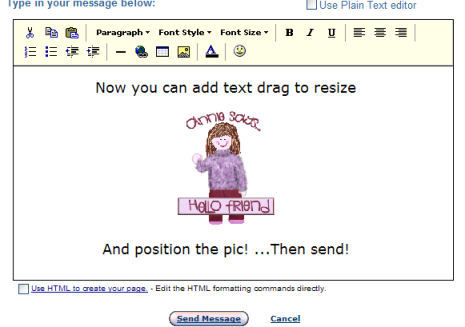
  • Now deselect the HTML option and your pic should appear

  • Finally

If you think ths will help friends in other groups then I am happy for you to share it!


Designed by TinaGolds@  do not remove this name